Logo Image
Logo Image
  • DJ Set Time machine
  • Live TV
    • Watch online
    • Where to watch
  • Videos
    • All TV Show Replay
    • Clubbing Experience
    • Live DJ Set
    • From The Studio
    • Clubbing TV Party
    • Special Shows
    • Music Videos
    • Awards
    • Clubbing LIve
  • News
    • Latest Electronic Music news
    • Clubs
    • Events
    • Festivals
    • Lifestyle
    • Music
    • French Scene
  • Features
    • Hot Take
    • Opinion
  • Events
    • Party Agenda
    • Submit your event
  • Network
    • Advertise with Clubbing TV
    • Submit your news
    • DJ, Producers & Performers
    • Labels
    • Festivals & Conferences
    • Clubs, Parties & Promoters
    • Rave photographies of the year
  • DJ Set Time machine
  • Live TV
    • Watch online
    • Where to watch
  • Videos
    • All TV Show Replay
    • Clubbing Experience
    • Live DJ Set
    • From The Studio
    • Clubbing TV Party
    • Special Shows
    • Music Videos
    • Awards
    • Clubbing LIve
  • News
    • Latest Electronic Music news
    • Clubs
    • Events
    • Festivals
    • Lifestyle
    • Music
    • French Scene
  • Features
    • Hot Take
    • Opinion
  • Events
    • Party Agenda
    • Submit your event
  • Network
    • Advertise with Clubbing TV
    • Submit your news
    • DJ, Producers & Performers
    • Labels
    • Festivals & Conferences
    • Clubs, Parties & Promoters
    • Rave photographies of the year
  • DJ Set Time machine
  • Live TV
    • Watch online
    • Where to watch
  • Videos
    • All TV Show Replay
    • Clubbing Experience
    • Live DJ Set
    • From The Studio
    • Clubbing TV Party
    • Special Shows
    • Music Videos
    • Awards
    • Clubbing LIve
  • News
    • Latest Electronic Music news
    • Clubs
    • Events
    • Festivals
    • Lifestyle
    • Music
    • French Scene
  • Features
    • Hot Take
    • Opinion
  • Events
    • Party Agenda
    • Submit your event
  • Network
    • Advertise with Clubbing TV
    • Submit your news
    • DJ, Producers & Performers
    • Labels
    • Festivals & Conferences
    • Clubs, Parties & Promoters
    • Rave photographies of the year
Share
Date
March 5, 2021
Categories
Lifestyle

How to produce Music with other artists live and remotely from any DAW

Post Image

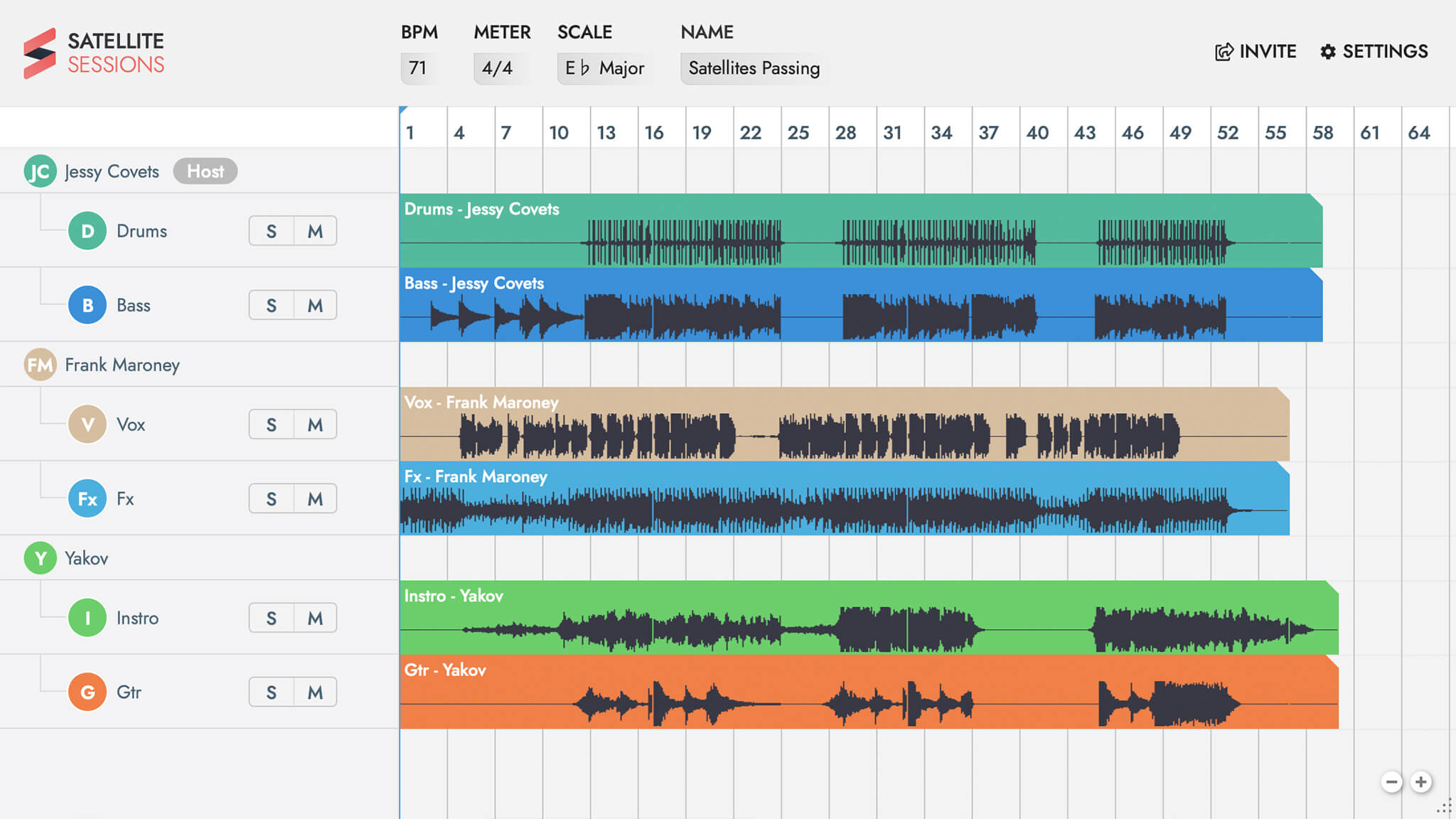
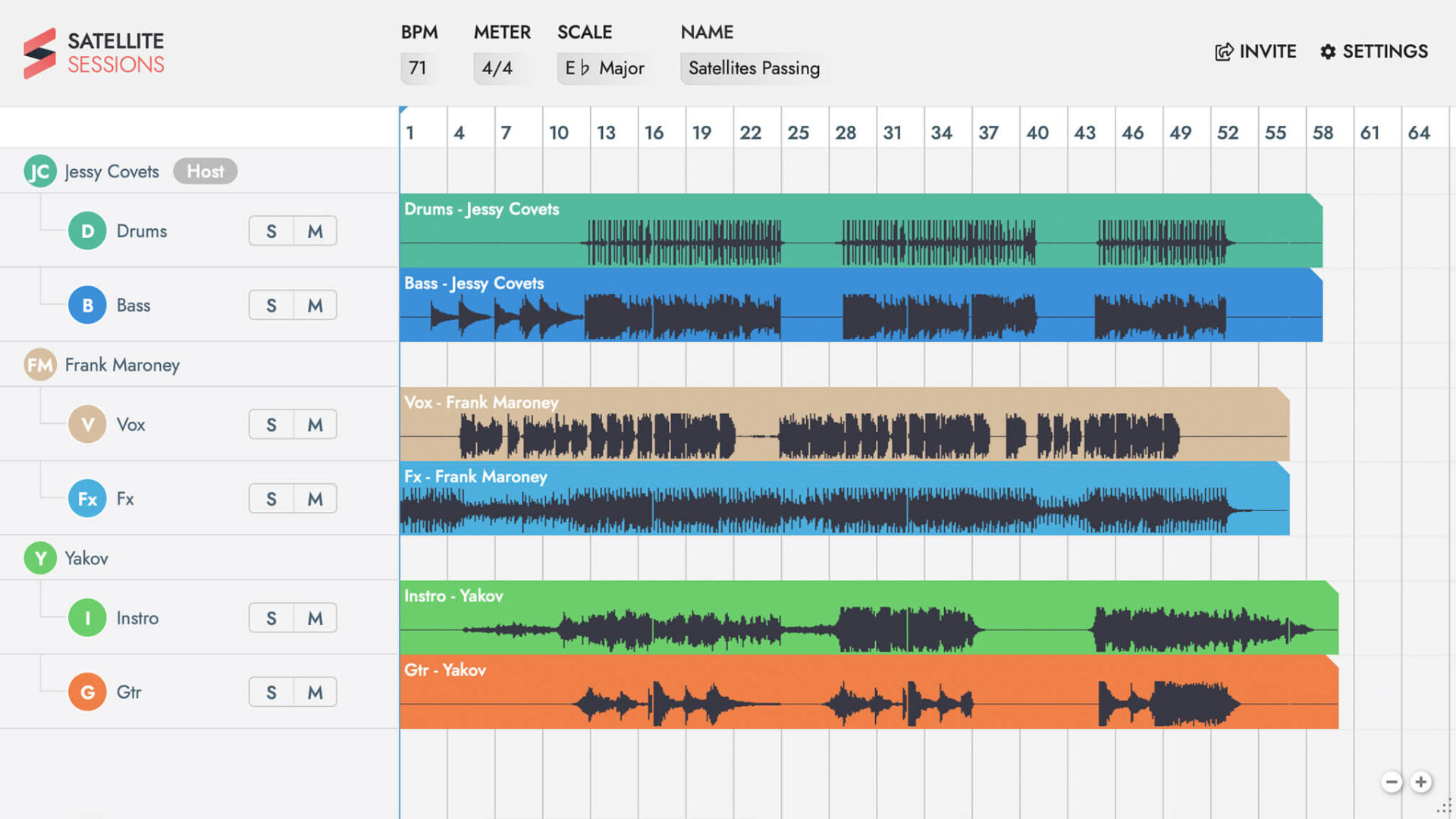
Despite the global lockdown, you can now, still continue to produce your Music and collaborate with other artists worldwide, and this, from any DAW and for FREE !


SATELLITE PLUGINS 2.0 by Mixed In Key offers the Fastest Way to Collaborate Inside Your DAW, Over the Internet.
Regardless of what DAW you and your collaborators use, you can exchange ideas within your DAW. Without bouncing stems or dealing with file sharing websites.
Guests can join your session for FREE. Work with them, exchange stems and make some great music together!

click here to download for FREE Elite Plugin 2.0
ELLITE PLUGINS 2.0 FREE DOWNLOAD 


SATELLITE PLUGINS 2.0 TOP FEATURES

1. Collaborate Across DAWs. Across Platforms
You can connect any DAWs together, like Ableton Live, Apple Logic, Pro Tools, Cubase, FL Studio, and more – So you and your friends can work together at the same time and make music as a team. The synchronization works like magic.


2. Collaborate with Friends All Over the World
Satellite Plugins bridges your DAWs, so you can all record music to the same session. Perform with musicians thousands of miles away or around the corner. The possibilities are endless.


3. Share MIDI
Use Satellite MIDI to share MIDI data with your collaborators. Anyone can download it into the Session, edit it and share it again, or use it to trigger new instruments.


4. No More Bouncing Stems
You won´t ever again need to send thousands of MB of stems to your collaboration partners. All you need to do is invite your friends to your Session and they can download the audio right there from your session. It´s super intuitive and fast.


5. Instant Collaboration
Once sessions are recorded you can download the audio to your DAW. You can even crop sections so you only download the parts you want to use. Then, make edits in your DAW and upload it again. Everyone in the session can hear the changes.


6. Backup your Projects
If you want to edit the session on one machine, and then resume from another, this is a really quick way to do it.


    Tagged with :
    Previous post
    Elrow Town London launches a 2021 Festival!
    Next post
    Happy International Women’s day!

    Latest News

    • Don’t make this about yourself: refocusing on victims in the dance music sceneFebruary 26, 2026
    • A DJ Shouldn’t Flirt From Their Professional Account.February 23, 2026
    • Hot Take : Leaving the underground doesn’t mean betraying the scene.February 23, 2026
    • When Your Favorite DJ/Artist Is Accused of Sexual Misconduct: How to Respond Without Fueling Silence (or Undermining a Case)February 22, 2026
    • Horst 2026 isn’t programming a festival. It’s shaping a shared ground.February 19, 2026
    Welc♥me
    to your
    Clubbing family
    • Live TV
    • Videos
    • News
    • Music Videos
    • Events
    • Awards
    • Advertise with Clubbing TV
    • Privacy Policy
    • Terms
    • About
    • Contact
    • Where to watch
    © Copyright Clubbing TV S.A.S .
    Follow Us
    Scroll to top
    • Sign in
    • New account

    Login with Google Login with Facebook

    Forgot your password?

    Lost your password? Please enter your email address. You will receive mail with link to set new password.

    Back to login

    Your cart

    No products in the cart.